
Content must be presented in ways that can be perceived through sight, hearing, or touch, making it accessible to users with different sensory abilities.
Accessibility Part 1: Text & Links
Making sure your site is equally accessible to everyone
What is Accessibility?
Did you know that websites are covered under the Americans with Disabilities Act (ADA), and must meet a specific criteria to be compliant and accessible?
Website accessibility means making your website usable and equally accessible for people with various disabilities. The Web Content Accessibility Guidelines (WCAG) 2.2 are organized around four principles (POUR):
Perceivable
Operable
All forms, controls, and navigation must be usable by people with disabilities, allowing them to interact with the website effectively.
Understandable
The interface should be easy to comprehend, with clear instructions and consistent design to prevent user confusion.
Robust
Content must be compatible with various technologies, including assistive devices like screen readers, ensuring it works across current and future tools.
Why is Accessibility Important?
According to the CDC, more than 70 million U.S. adults (over 1 in 4) live with a disability. Under the Americans with Disabilities Act (ADA), state and local governments, along with businesses open to the public, are legally required to make their websites accessible. Each year, thousands of accessibility-related lawsuits are filed against organizations that fail to comply.
Accessibility is better for your users, and better for you.
Here’s the good news. Your website’s design and code will already be engineered by Asher to pass color contrast ratios and technical best practices.
What accessibility do I need to know?
Since the design and code are being handled by Asher, that just leaves the site’s content – text, images, and other media.
These fall into three main areas:
Headings & Text
This is for SEO and also for users to visualize your content better.
Hyperlinks
Making sure users and devices can read links correctly, and the text describes the destination correctly.
Media
Adding alt text to images that is concise, and not redundant.
Headings & Text
Headings organize page content and signal importance to both users and search engines, making them vital for accessibility and SEO (search engine optimization).
Web Content Accessibility Guidelines (WCAG) states:
H1
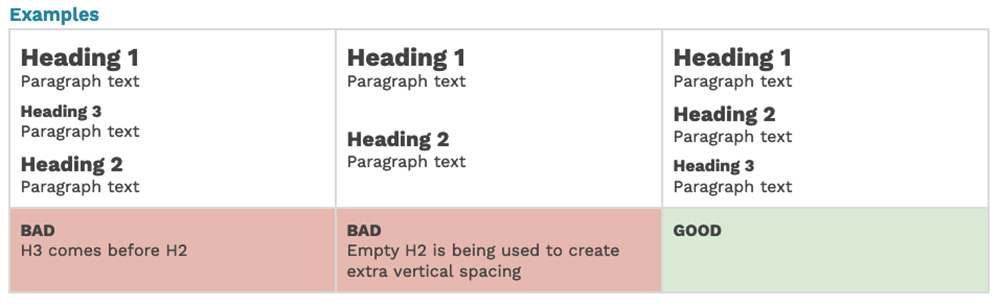
Each page has one H1 (Heading 1 – the large title at the top).
H2 and H3
Use H2’s for main sections, H3’s for subsections, always in order (don’t skip levels or choose based on style).
No Empty Headings
Avoid accidental empty headings from extra returns—check formatting carefully.
Emphasis
Don’t use a heading for the styling/appearance alone. If you need to emphasize normal “paragraph” copy, use bold or italic instead of incorrect heading levels.
Hyperlinks
Hyperlinks include text links, buttons, menus, and images, and must be clear, descriptive, and functional.
Web Content Accessibility Guidelines (WCAG) states:
- Every link should include clear clickable text and a working destination. If using an image as a link, include text alongside it so users know where it goes.
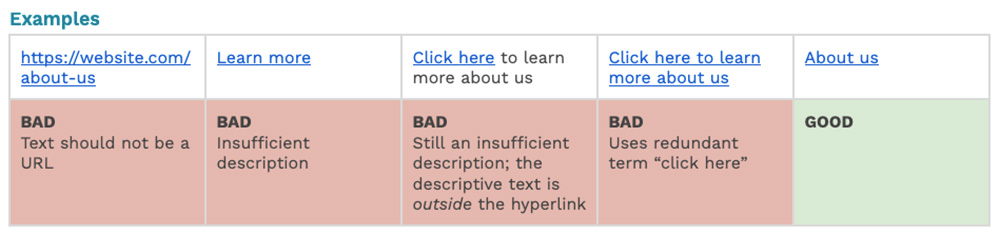
- Link text should clearly explain what the user will open, even if it’s read on its own. For example, use “Our Services” instead of “Learn more.” What is the user learning more about?
- Avoid generic phrases like “click here” or “link to,” since the link text itself should already explain the destination.
- Whenever possible, use friendly, readable text instead of displaying the full URL (for example, “About Us” instead of website.com/about-us).
- Make sure all links work properly and go to the correct page, website, or section.
- Avoid placing multiple links next to each other that go to the same place, as this can create unnecessary repetition for some users.
Media
Media encompasses any images, videos, or files you upload or embed on your site. Depending on the media type, there are different rules to follow.
We’ll discuss images and videos at a later time during WordPress training, but for now, we’ll just focus on Files, since these may require more prep work.
Files
Accessibility standards apply to downloadable files on your website too, including PDFs, Word documents, spreadsheets, and presentations. These files need their own accessibility review process to ensure they meet standards.
In some cases, such as annual reports or complex spreadsheets, a downloadable file may still be the best format. However, whenever possible, we recommend turning that content into native website pages instead. This improves accessibility, creates a better mobile experience, supports SEO, and avoids the added time and cost of remediating files each time they are updated.