
Accessibility Part 2: Media
Website accessibility means making your website usable and equally accessible for people with various disabilities.
Media
Media encompasses any images, videos, or files you upload or embed on your site. Depending on the media type, there are different rules to follow.
Image Alternative Text
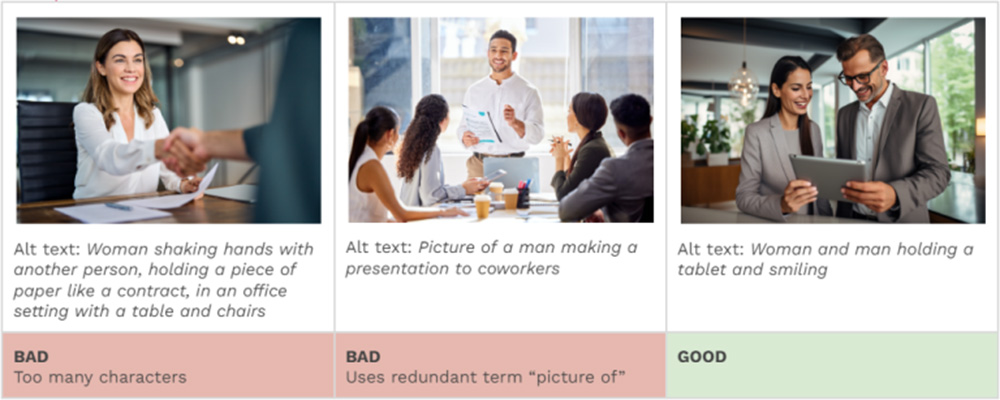
Alternative text (or “alt text”) describes an image for users with visual disabilities using screen readers, as well as search engines, and will display in place of the image if the file fails to load.
Web Content Accessibility Guidelines (WCAG) states:
- Keep it concise (under 100 characters).
- Avoid redundant phrases like “image of” or “picture of.”
- Make each image’s alt text unique—don’t reuse across multiple images.

Images Of Text
- Real website text is clearer on mobile, easier to resize, more accessible, and better for SEO than text placed inside an image.
- Avoid using images for text that people need to read. Instead, use your website’s built-in text fields and modules whenever possible.
- Because automated scans usually can’t detect text embedded in images, it’s especially important to follow this best practice during content updates.
- Acceptable exceptions include:
- logos, wordmarks, infographics, or other design elements where exact visual styling is essential.
- Decorative text within an image may also be appropriate when the surrounding page content already provides the necessary context and no meaning is lost if the image is not viewed.
- In these cases, the image’s alt text should match the visible text as closely as possible.
Audio / Video
Any media with audio needs to have captions and/or a transcript to be accessible for users with auditory disabilities. This includes audio-only media (like a podcast) as well as videos that have an audio track.
Important: When embedding video on the site, just use the YouTube or Vimeo link instead of uploading the video file to the website.
Files
Accessibility standards apply to downloadable files on your website too, including PDFs, Word documents, spreadsheets, and presentations. These files need their own accessibility review process to ensure they meet standards.
In some cases, such as annual reports or complex spreadsheets, a downloadable file may still be the best format. However, whenever possible, we recommend turning that content into native website pages instead. This improves accessibility, creates a better mobile experience, supports SEO, and avoids the added time and cost of remediating files each time they are updated.